> For the complete documentation index, see [llms.txt](https://docs.softhub.vn/llms.txt). Markdown versions of documentation pages are available by appending `.md` to page URLs; this page is available as [Markdown](https://docs.softhub.vn/twitter-chrome-manager/huong-dan-su-dung/tinh-nang-tuong-tac/tuong-tac-follower.md).
# Tương tác follower
Lợi ích:
* Phần mềm sẽ tương tác các bài viết của các follower của tài khoản như người dùng thật
* Giúp nuôi nick cứng, tăng thời gian hoạt động, tăng tương tác, tăng độ trust cho nick
* Nuôi nick trâu hơn sẽ tránh tình trạng Twitter quét.
HDSD:
* Chọn vào tính năng "Tương tác follower"
* Chọn vào Tải để load các tài khoản đang hoạt động
* Loại bỏ các tài khoản không muốn chạy tương tác bằng cách click chuột phải và chọn "Loại bỏ"
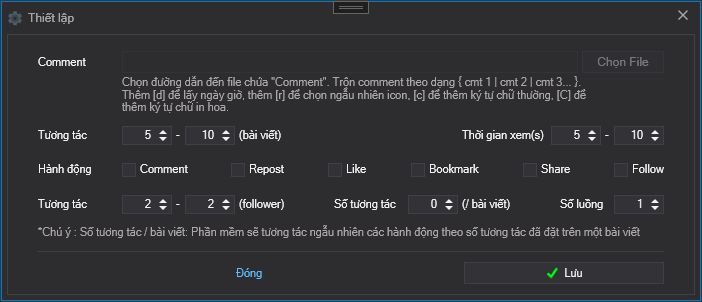
* Mở bảng cấu hình chạy tính năng
\- Comment : Click vào "Chọn File" để chọn lấy file chứa các comment. Định dạng nội dung: { comment 1 | comment 2 | comment 3...}
\- Tương tác: Là số bài viết tương tác
\- Thời gian xem (s) : Là thời gian xem của các bài viết được tương tác, được tính bằng giây
\- Hành động : Tích chọn vào các ô như like, comment, follow\... để tương tác bài viết
\- Tương tác follower: Là số follower được tương tác
\- Số tương tác / bài viết: Giả sử đặt số tương tác / bài viết là 2. Số hành động đã chọn là 6. Khi ấy phần mềm sẽ lấy ngẫu nhiên 2 trên tổng số 6 hành động đã chọn để tương tác bài viết. Điều này sẽ giúp các tài khoản tương tác như người dùng thật, tránh tình trạng các tài khoản tương tác như nhau.
\- Số luồng : Là số tài khoản chạy cùng một lúc để chạy tính năng
\- Lưu: Sau khi đã cấu hình xong hãy click vào "Lưu" để lưu lại cấu hình
* Cuối cùng click vào "START" để chạy tiến trình tương tác
Video hướng dẫn:
{% embed url="" %}