> For the complete documentation index, see [llms.txt](https://docs.softhub.vn/llms.txt). Markdown versions of documentation pages are available by appending `.md` to page URLs; this page is available as [Markdown](https://docs.softhub.vn/hotmail-chrome-manager/huong-dan-su-dung/doi-mat-khau-email.md).

# Đổi mật khẩu email

Lợi ích:

* Thay đổi mật khẩu tài khoản
* Giúp bảo vệ tài khoản, tránh tình trạng bị mất tài khoản khi nuôi số lượng lớn.

HDSD:

* Chọn vào tính năng "Đổi mật khẩu email"

<figure><img src="/files/yaxrSkDX2siIbods31dT" alt=""><figcaption></figcaption></figure>

* Chọn vào Tải để load các tài khoản đang hoạt động&#x20;
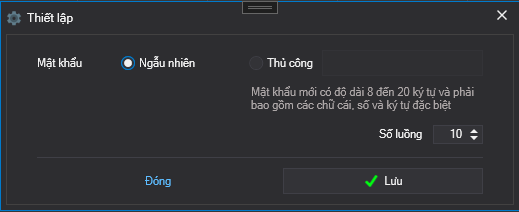
* Mở bảng cấu hình&#x20;

<figure><img src="/files/Ynl1BdtHFUsu48GU9Q48" alt=""><figcaption></figcaption></figure>

\- Ngẫu nhiên : Phần mềm sẽ tạo ngẫu nhiên mật khẩu cho các tài khoản

\- Thủ công : Quý khách sẽ phải tự nhập mật khẩu bằng tay và mật khẩu phải đáp ứng điều kiện như trong ghi chú.

\- Số luồng : Là số tài khoản chạy cùng một lúc để chạy tính năng

\- Lưu: Sau khi đã cấu hình xong hãy click vào "Lưu" để lưu lại cấu hình

* Cuối cùng click vào "START" để chạy tiến trình tương tác
* Video hướng dẫn:

{% embed url="<https://www.youtube.com/watch?index=4&list=PLvJk1kyzTiXLXl5r-5n2NcCZO7tvJTt7X&v=L4f-lvPjEgM>" %}


---

# Agent Instructions
This documentation is published with GitBook. GitBook is the documentation platform designed so that both humans and AI agents can read, navigate, and reason over technical content effectively. Learn more at gitbook.com.

## Querying This Documentation
If you need additional information that is not directly available in this page, you can query the documentation dynamically by asking a question.

Perform an HTTP GET request on the current page URL with the `ask` query parameter:

```
GET https://docs.softhub.vn/hotmail-chrome-manager/huong-dan-su-dung/doi-mat-khau-email.md?ask=<question>
```

The question should be specific, self-contained, and written in natural language.
The response will contain a direct answer to the question and relevant excerpts and sources from the documentation.

Use this mechanism when the answer is not explicitly present in the current page, you need clarification or additional context, or you want to retrieve related documentation sections.